

How to create an ecommerce website – Guide
Building an e-commerce site helps businesses thrive by meeting goals, offering seamless shopping, and unlocking opportunities for growth in the digital world.
 Guide
GuideOn this page15 sections
- What is E-commerce?
- Why is E-commerce Important?
- Step-by-Step Guide to Creating an E-commerce Website
- 1. Define Your Niche and Goals
- 2. Choose a Domain Name and Hosting
- 3. Select an E-commerce Platform
- 4. Design Your Website
- 5. Add Products and Descriptions
- 6. Set Up Payment and Shipping Options
- 7. Enable Security Features
- 8. Optimize for SEO
- 9. Test and Launch
- 10. Promote Your E-commerce Website
- Examples of Successful E-commerce Websites
- The Bottom Line
In today’s digital age, e-commerce has significantly transformed the way businesses sell their products and services. As a result, entrepreneurs and business owners are increasingly turning to online stores to expand their reach and boost sales. This guide will walk you through everything you need to know about creating an e-commerce website. Specifically, it will explain its purpose, highlight key benefits, and provide a simple step-by-step process to get started.
What is E-commerce?
E-commerce, or electronic commerce, refers to the process of buying and selling goods or services online. This approach enables businesses to reach customers worldwide, operate around the clock, and simplify transactions through digital platforms.

An e-commerce website serves as the online counterpart of a physical store. For instance, it allows customers to browse products, add items to a virtual cart, and complete secure payments—all without leaving the comfort of their home.
Why is E-commerce Important?
E-commerce is an essential tool for businesses aiming to expand their market reach and adapt to evolving consumer preferences. Moreover, it offers numerous benefits that make it indispensable in today’s competitive environment. Here’s why it matters:
- Convenience: Customers can shop anytime, anywhere.
- Broader Reach: Sell to local and international audiences without geographical limitations.
- Cost-Effective: Reduces overhead costs like rent and utilities associated with physical stores.
- Data Insights: Provides analytics to track customer behavior, preferences, and sales trends.
- Personalization: Allows businesses to tailor marketing efforts through customer data.
Step-by-Step Guide to Creating an E-commerce Website
1. Define Your Niche and Goals
- Decide what you want to sell: physical products, digital goods, or services.
- Identify your target audience and competitors.
- Set goals for your website, such as increasing sales or building brand awareness.
2. Choose a Domain Name and Hosting
- Select a domain name that reflects your brand and is easy to remember (e.g., myshop.com).
- Choose a reliable hosting provider, such as Bluehost, SiteGround, or HostGator, to ensure your site loads quickly and stays online.
3. Select an E-commerce Platform
- Pick a platform that suits your needs and budget. Popular options include: Shopify: Ideal for beginners with user-friendly features. WooCommerce: A WordPress plugin offering flexibility and customization. BigCommerce: Great for scalability with built-in SEO tools. Wix eCommerce: Best for small businesses needing simple solutions.
- Shopify: Ideal for beginners with user-friendly features.
- WooCommerce: A WordPress plugin offering flexibility and customization.
- BigCommerce: Great for scalability with built-in SEO tools.
- Wix eCommerce: Best for small businesses needing simple solutions.
4. Design Your Website
- Use pre-built templates or hire a web designer for a unique look.
- Focus on user experience (UX): Ensure navigation is intuitive. Optimize for mobile devices. Highlight product categories and search functionality.
- Ensure navigation is intuitive.
- Optimize for mobile devices.
- Highlight product categories and search functionality.
5. Add Products and Descriptions
- Upload high-quality images for each product.
- Write clear, compelling descriptions that include key details like size, materials, and benefits.
- Use keywords to optimize for search engines (SEO).
6. Set Up Payment and Shipping Options
- Choose secure payment gateways like PayPal, Stripe, or Square.
- Offer multiple payment methods (credit cards, bank transfers, etc.).
- Define shipping policies and provide options like standard or express delivery.
7. Enable Security Features
- Install an SSL certificate to protect customer data.
- Use secure hosting and regularly update software to prevent vulnerabilities.
8. Optimize for SEO
- Research keywords related to your products and incorporate them into product pages.
- Use meta descriptions and alt text for images.
- Publish blogs or guides to improve site visibility.
9. Test and Launch
- Test your website on various devices to ensure functionality.
- Check payment processes, cart features, and page load times.
- Fix any bugs before going live.
10. Promote Your E-commerce Website
- Use social media platforms to reach potential customers.
- Run targeted ads through Google Ads or Facebook.
- Offer discounts, free shipping, or referral bonuses to attract initial buyers.
Examples of Successful E-commerce Websites
- Amazon: The world’s largest online retailer, offering a vast range of products with advanced personalization features.
- Etsy: A platform for handmade and vintage items, focusing on niche markets and small businesses.
- Zappos: Known for its customer service, specializing in footwear and clothing.
- Shopify Stores: Many independent businesses use Shopify to create professional online stores tailored to their brand.
The Bottom Line
Creating an e-commerce website is a vital step for businesses that want to succeed in today’s digital world. With the right approach, you can build an online store that not only supports your business goals but also provides a smooth shopping experience for your customers. Furthermore, whether you are just starting out or looking to grow your operations, an e-commerce website can unlock countless opportunities for your business.
Ready to take the plunge? If you need expert guidance or a customized solution, our team at NetForemost is here to help. Let’s bring your e-commerce vision to life!
Keep reading
All resources Case study
Health and Wellness Mobile App Development Case Study
When a client's input slows down in the middle of a project, delivery does not have to stall.
 Case study
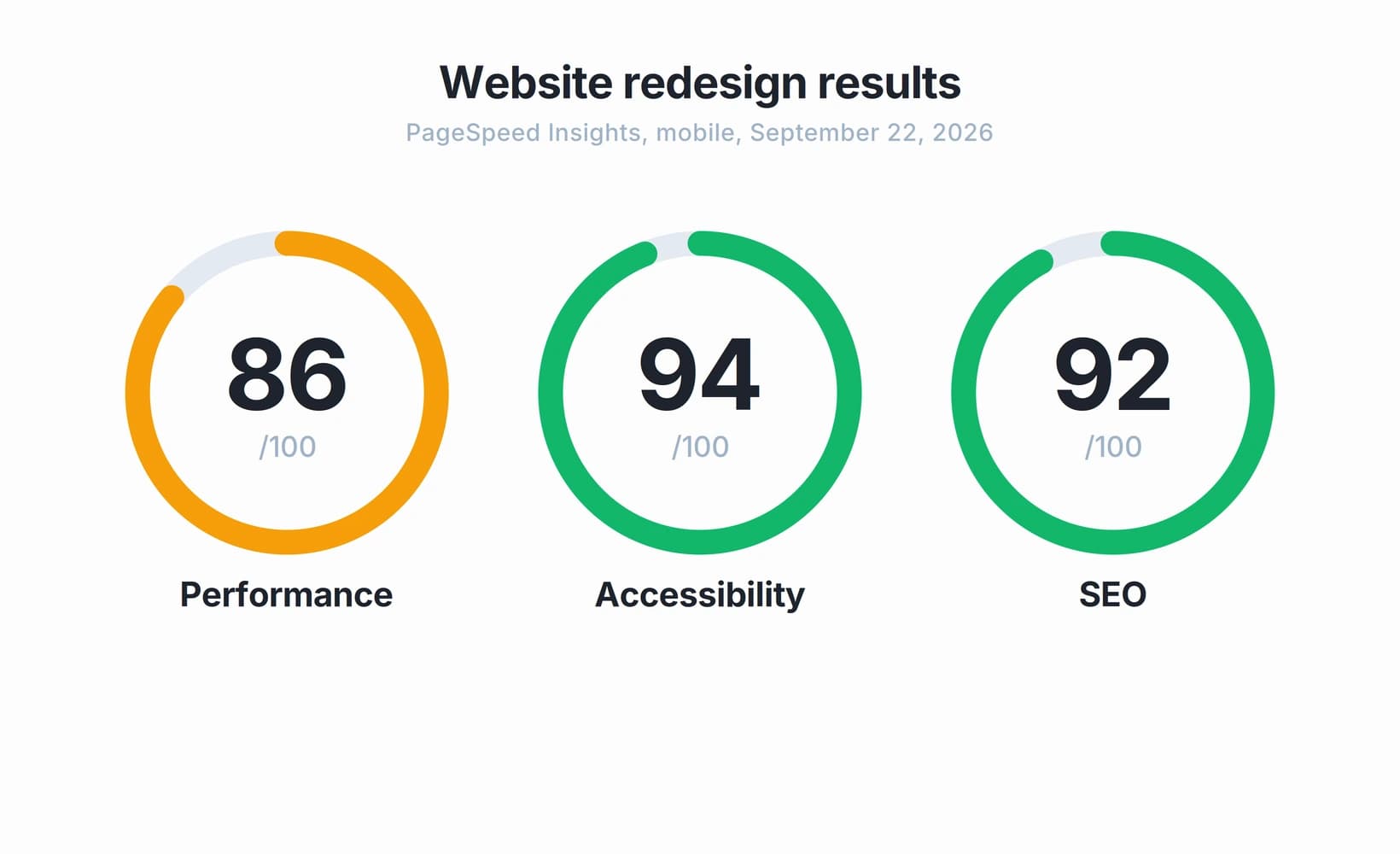
How a B2B website redesign reached strong mobile scores in 2 to 3 weeks
A B2B technology company needed to redesign and relaunch its website in two to three weeks. Here's how NetForemost took the project from design through production while measuring performance, accessibility and SEO on mobile.
 Guide
GuideFull-stack development services: how to evaluate a full-stack team before you sign
Full-stack capability is not the same as integrated delivery. Here is a practical way to tell whether you are hiring one accountable team or a collection of roles, before you sign.